Next.js에서 params should be awaited 오류를 어떻게 해결하나요?
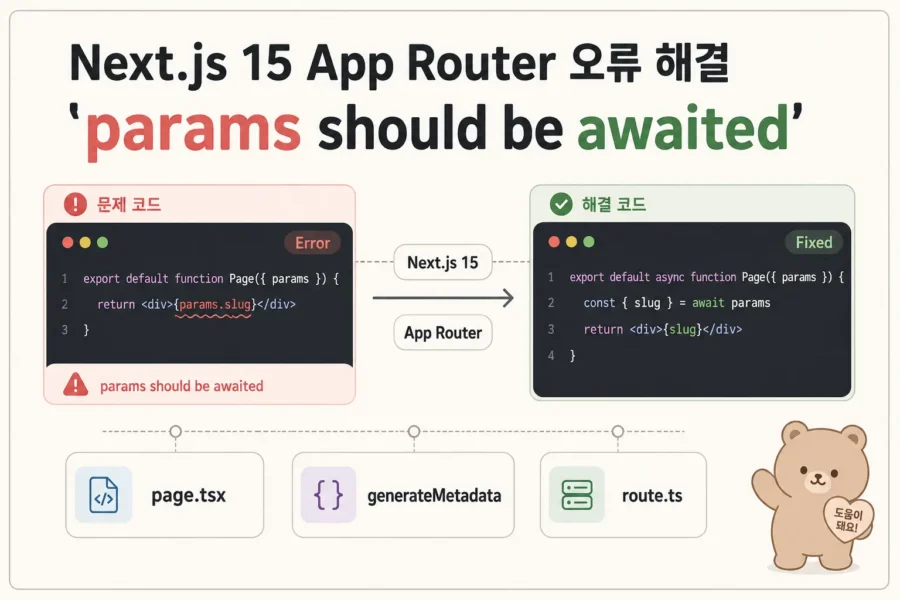
params should be awaited 오류는 설치한 App Router 버전의 params 계약부터 확인합니다. 본문의 Promise 형태 예제에서는 async 페이지와 generateMetadata가 params를 await한 뒤 id를 읽습니다.
적용 조건·범위: 독립 오류 예제의 params: { id: string }과 params.id를 Promise<{ id: string }>, await params로 수정합니다. 설치된 Next.js 버전과 공식 문서의 API 기준을 맞춥니다.
본문 근거: Dynamic Segments
독립 실습: 페이지와 metadata에서 같은 params 기다리기
React 컴포넌트·TypeScript·async/await를 알고 시작합니다. Next.js 환경 준비의 루트 app/ TypeScript App Router 프로젝트를 별도 연습 폴더에서 사용합니다. 이 글의 기존 실습 기준은 Next.js 16.3.5이며 Cache Components는 끈 구성입니다. 생성된 app/layout.tsx는 유지합니다. 아래 파일은 TaskFlow·인증·DB 없이 실행하는 독립 예제입니다.
npm run dev 후 /items/one을 열고 제목과 탭을 확인합니다. npm run build도 실행합니다.
app/items/[id]/page.tsx 전체 코드
import type { Metadata } from 'next';
type Props = { params: Promise<{ id: string }> };
export async function generateMetadata({ params }: Props): Promise<Metadata> {
  const { id } = await params;
  return { title: `항목 ${id}` };
}
export default async function Page({ params }: Props) {
  const { id } = await params;
  return <h1>항목 {id}</h1>;
}
기대 결과: 본문과 문서 제목에 항목 one이 반영됩니다. 두 함수 모두 params를 await합니다.
자가 확인: page만 수정하고 generateMetadata의 동기 접근을 남기면 왜 같은 계열 오류가 남는지 설명합니다.
잘못된 예
export default function Page({
  params,
}: {
  params: { id: string };
}) {
  return <p>{params.id}</p>;
}
수정
export default async function Page({
  params,
}: {
  params: Promise<{ id: string }>;
}) {
  const { id } = await params;

  return <p>{id}</p>;
}
generateMetadata
import type { Metadata } from 'next';

export async function generateMetadata({
  params,
}: {
  params: Promise<{ id: string }>;
}): Promise<Metadata> {
  const { id } = await params;

  return {
    title: '작업 ' + id,
  };
}
자주 발생하는 오류
- page는 수정했지만 generateMetadata는 과거 타입 유지
- 공식 문서와 프로젝트 Next.js 버전 불일치
- use client로 문제를 덮음
- params와 searchParams 혼동
선택 실습: 할 일 앱에 적용하기
TaskFlow는 작업을 추가·완료·삭제하는 할 일 앱입니다. 이 선택 실습에서는 Next.js로 페이지와 서버 기능을 확장합니다.
이전 회차부터 올바른 Promise params와 await를 사용합니다. 완료 코드를 일부러 잘못된 동기 params로 되돌리지 않고, 상단의 오류 예제와 비교해 수정 기준을 익힙니다.
선택: 연재 프로젝트와 전체 자료
연재 프로젝트를 이어 만드는 분을 위한 자료입니다. 이 글의 개념과 예제만 찾으셨다면 필요한 파일과 실행 방법만 펼쳐보세요.
TaskFlow Next.js 프로젝트 적용
시작 체크포인트: 이전: Next.js 동적 라우트 slug params catch-all의 완료 상태에서 이어갑니다.
이전 회차 완료 ZIP으로 시작하기. 새 폴더에 풀어 현재 회차 완료본과 나란히 비교합니다.
이전 완료본과 달라진 파일: package.json. 아래 변경 설명을 따라 수정하고 전체 코드의 같은 파일과 대조합니다.
직접 확인: 이미 수정된 TaskFlow와 독립 오류 예제
독자 질문: params should be awaited 경고가 나오면 무엇을 바꿔야 할까요? 상단의 잘못된 코드와 수정 코드를 비교합니다. 완료 ZIP은 이미 Promise/await 형태이므로 오류를 만들려고 코드를 되돌리지 않습니다.
app/(app)/tasks/[id]/page.tsx와app/(app)/@modal/(.)tasks/[id]/page.tsx에서params: Promise<{ id: string }>와const { id } = await params를 확인합니다./tasks/task-1직접 접근은 전체 상세, 목록 Link 이동은 모달입니다.- 독립 오류 예제의
params: { id: string }과params.id를Promise<{ id: string }>,await params로 수정합니다. 설치된 Next.js 버전과 공식 문서의 API 기준을 맞춥니다. - 상단
generateMetadata코드는 독립 예제입니다. 완료 ZIP에는 해당 구현이 없어 메타데이터 제목 변경을 TaskFlow 실행 결과로 기대하지 않습니다. 자신의 프로젝트에 구현했다면 그 함수에서도 await를 확인합니다. npm run typecheck,npm run build와 직접 URL의 화면을 각각 확인하고 종료 코드를 기록합니다.
오류 점검
use client로 서버의 params 접근 오류를 덮지 않습니다. searchParams와 경로 params도 구분합니다. 페이지를 수정해도 오류가 남으면 다른 route와 자신의 generateMetadata의 동기 접근을 찾습니다.
검증 상태: 이번 편집에서 잘못된 예제의 오류를 재현하거나 타입 검사·빌드·서버·브라우저를 실행하지 않았습니다. 실제 메시지와 실행 결과는 미확인입니다.
다음 학습
11회차에서는 loading·error·not-found 경계를 구분합니다.
완료 코드 ZIP 다운로드 — next-step-10-async-params
이전 체크포인트: next-step-09-dynamic-route
이번 회차의 변경
이전 회차부터 올바른 Promise params와 await를 사용합니다. 완료 코드를 일부러 잘못된 동기 params로 되돌리지 않고, 상단의 오류 예제와 비교해 수정 기준을 익힙니다.
이 회차는 이전 프로젝트의 실행 코드를 유지하고 설정·오류·운영 기준을 점검합니다.
전체 파일·코드 보기
실행과 검증
Node.js 22 LTS 이상 권장(Next.js 최소 20.9). 루트 app/ 구조, CSS 사용.
npm install
npm run dev
npm run build
npm run start
전체 코드와 ZIP은 같은 완료 체크포인트입니다. 자동 생성 worker는 ZIP에 포함하며 라이브러리 파일은 코드 뷰어에서 생략합니다.
완료 체크포인트: next-step-10-async-params
실습 프로젝트 전체 코드
.gitignore
node_modules
.next
.env*
!.env.example
*.tsbuildinfo
app/(app)/@modal/(.)tasks/[id]/page.tsx
import { getTask } from "@/app/lib/data";
import { notFound } from "next/navigation";
import Link from "next/link";
import Modal from "@/app/ui/modal";
export default async function TaskModal({
  params,
}: {
  params: Promise<{ id: string }>;
}) {
  const { id } = await params;
  const task = await getTask(id);
  if (!task) notFound();
  return (
    <Modal>
      <h1>{task.title}</h1>
      <p>{task.description}</p>
      <p>상태: {task.completed ? "완료" : "진행 중"}</p>
    </Modal>
  );
}
app/(app)/@modal/[…catchAll]/page.tsx
export default function ResetModal() {
  return null;
}
app/(app)/@modal/default.tsx
export default function Default() {
  return null;
}
app/(app)/layout.tsx
import type { ReactNode } from "react";
import SiteHeader from "@/app/_components/SiteHeader";
export default async function AppLayout({
  children,
  modal,
}: {
  children: ReactNode;
  modal: ReactNode;
}) {
  return (
    <>
      <SiteHeader />
      {children}
      {modal}
    </>
  );
}
app/(app)/settings/page.tsx
export default function SettingsPage() {
  return (
    <main>
      <h1>설정</h1>
      <p>TaskFlow 설정 화면입니다.</p>
    </main>
  );
}
app/(app)/tasks/[id]/page.tsx
import { getTask } from "@/app/lib/data";
import { notFound } from "next/navigation";
import Link from "next/link";
export default async function TaskDetail({
  params,
}: {
  params: Promise<{ id: string }>;
}) {
  const { id } = await params;
  const task = await getTask(id);
  if (!task) notFound();
  return (
    <main>
      <h1>{task.title}</h1>
      <p>{task.description}</p>
      <p>상태: {task.completed ? "완료" : "진행 중"}</p>
      <Link href="/tasks">목록</Link>
    </main>
  );
}
app/(app)/tasks/page.tsx
import Link from "next/link";
import { getTasks } from "@/app/lib/data";
import TaskSearch from "@/app/ui/task-search";
export default async function TasksPage() {
  const tasks = await getTasks();
  return (
    <main>
      <h1>작업 목록</h1>
      <TaskSearch />
      <ul>
        {tasks.map((task) => (
          <li key={task.id}>
            <Link href={"/tasks/" + task.id}>{task.title}</Link>
            <span> · {task.completed ? "완료" : "진행 중"}</span>
          </li>
        ))}
      </ul>
    </main>
  );
}
app/(app)/template.tsx
import type { ReactNode } from "react";
export default function Template({ children }: { children: ReactNode }) {
  return <>{children}</>;
}
app/(public)/page.tsx
import Link from "next/link";
export default function HomePage() {
  return (
    <main>
      <h1>TaskFlow Next.js</h1>
      <p>App Router 기반 작업 관리 서비스입니다.</p>
      <Link href="/tasks">작업 목록 보기</Link>
    </main>
  );
}
app/_components/SiteHeader.tsx
import Link from "next/link";
export default function SiteHeader() {
  return (
    <header>
      <nav aria-label="주 메뉴">
        <Link href="/">홈</Link>
        <Link href="/tasks">작업</Link>
        <Link href="/settings">설정</Link>
      </nav>
    </header>
  );
}
app/globals.css
* {
  box-sizing: border-box;
}
body {
  margin: 0;
  color: #171717;
  background: #fafafa;
  font-family: Arial, sans-serif;
  line-height: 1.6;
}
header,
main {
  width: min(880px, calc(100% - 32px));
  margin: 24px auto;
}
nav {
  display: flex;
  flex-wrap: wrap;
  gap: 16px;
  align-items: center;
}
a {
  color: inherit;
  text-underline-offset: 3px;
}
button,
input,
select {
  min-height: 44px;
  padding: 8px 12px;
  font: inherit;
  border: 1px solid #aaa;
  background: #fff;
  color: #171717;
  max-width: 100%;
}
button {
  cursor: pointer;
}
button:disabled {
  opacity: 0.6;
  cursor: wait;
}
input {
  display: block;
  width: 100%;
}
label {
  display: block;
}
form,
section,
aside {
  margin: 20px 0;
}
ul {
  padding: 0;
  list-style: none;
}
li {
  padding: 12px;
  margin: 12px 0;
  border: 1px solid #ccc;
  overflow-wrap: anywhere;
}
.controls {
  display: flex;
  flex-wrap: wrap;
  gap: 8px;
  align-items: center;
}
.controls form {
  margin: 0;
}
.modal {
  width: min(640px, calc(100% - 32px));
  border: 1px solid #777;
  padding: 24px;
  background: #fff;
  color: #171717;
}
.modal::backdrop {
  background: rgb(0 0 0 / 55%);
}
:focus-visible {
  outline: 3px solid #555;
  outline-offset: 3px;
}
[data-theme="dark"] {
  background: #202020;
  color: #fafafa;
  padding: 16px;
}
[data-density="compact"] li {
  padding: 8px;
  margin: 8px 0;
}
img {
  max-width: 100%;
  height: auto;
}
app/layout.tsx
import type { Metadata } from "next";
import type { ReactNode } from "react";
import "./globals.css";
export const metadata: Metadata = {
  title: { default: "TaskFlow Next.js", template: "%s | TaskFlow" },
  description: "서버와 브라우저 역할을 배우는 TaskFlow 학습 프로젝트",
};
export default function RootLayout({ children }: { children: ReactNode }) {
  return (
    <html lang="ko">
      <body>{children}</body>
    </html>
  );
}
app/lib/data.ts
import type { Task } from "./types";
const tasks: Task[] = [
  {
    id: "task-1",
    title: "App Router 공부",
    description: "서버와 브라우저의 역할을 구분합니다.",
    completed: false,
    ownerId: "demo",
  },
  {
    id: "task-2",
    title: "TaskFlow 만들기",
    description: "누적 실습을 완성합니다.",
    completed: true,
    ownerId: "demo",
  },
];
export async function getTasks() {
  return tasks;
}
export async function getTask(id: string) {
  return tasks.find((t) => t.id === id);
}
export async function getTaskStats() {
  const ts = await getTasks();
  return { total: ts.length, completed: ts.filter((t) => t.completed).length };
}
app/lib/types.ts
export type Task = {
  id: string;
  title: string;
  description: string;
  completed: boolean;
  ownerId: string;
};
app/ui/modal.tsx
"use client";
import { useEffect, useRef, type ReactNode } from "react";
import { useRouter } from "next/navigation";
export default function Modal({ children }: { children: ReactNode }) {
  const ref = useRef<HTMLDialogElement>(null);
  const router = useRouter();
  useEffect(() => {
    const dialog = ref.current;
    if (dialog && !dialog.open) dialog.showModal();
    return () => {
      dialog?.close();
    };
  }, []);
  return (
    <dialog
      className="modal"
      ref={ref}
      aria-label="작업 상세"
      onCancel={(event) => {
        event.preventDefault();
        router.back();
      }}
    >
      <button type="button" onClick={() => router.back()}>
        닫기
      </button>
      {children}
    </dialog>
  );
}
app/ui/task-search.tsx
"use client";
import { useState } from "react";
export default function TaskSearch() {
  const [keyword, setKeyword] = useState("");
  return (
    <label>
      작업 검색
      <input
        value={keyword}
        onChange={(event) => setKeyword(event.target.value)}
        placeholder="검색어 입력"
      />
    </label>
  );
}
next-env.d.ts
/// <reference types="next" />
/// <reference types="next/image-types/global" />
import "./.next/types/routes.d.ts";
import "./.next/types/root-params.d.ts";


// NOTE: This file should not be edited
// see https://nextjs.org/docs/app/api-reference/config/typescript for more information.
next.config.ts
import type { NextConfig } from "next";
const config: NextConfig = { cacheComponents: false };
export default config;
package.json
{
  "name": "taskflow-next",
  "version": "1.0.10",
  "private": true,
  "scripts": {
    "dev": "next dev",
    "build": "next build --webpack",
    "start": "next start",
    "typecheck": "tsc --noEmit"
  },
  "dependencies": {
    "next": "16.3.5",
    "react": "19.3.0",
    "react-dom": "19.3.0"
  },
  "devDependencies": {
    "typescript": "5.9.3",
    "@types/node": "24.13.6",
    "@types/react": "19.3.0",
    "@types/react-dom": "19.3.0"
  }
}
tsconfig.json
{
  "compilerOptions": {
    "target": "ES2020",
    "lib": [
      "dom",
      "dom.iterable",
      "esnext"
    ],
    "allowJs": true,
    "skipLibCheck": true,
    "strict": true,
    "noEmit": true,
    "esModuleInterop": true,
    "module": "esnext",
    "moduleResolution": "bundler",
    "resolveJsonModule": true,
    "isolatedModules": true,
    "jsx": "react-jsx",
    "incremental": true,
    "plugins": [
      {
        "name": "next"
      }
    ],
    "paths": {
      "@/*": [
        "./*"
      ]
    }
  },
  "include": [
    "next-env.d.ts",
    "**/*.ts",
    "**/*.tsx",
    ".next/types/**/*.ts",
    ".next/dev/types/**/*.ts"
  ],
  "exclude": [
    "node_modules"
  ]
}
글 소개·학습 준비·전체 목차
Next.js · 10/38 · TaskFlow 누적 실습
Next.js params should be awaited 오류 해결
Next.js · 10 / 38 · 필수 선수 · 오류 해결
최신 App Router에서는 params가 Promise 형태로 전달되는 API가 사용됩니다. 오래된 예제를 그대로 복사하면 params should be awaited 계열 경고나 타입 오류를 만날 수 있습니다.
이번 글에서 배우는 내용
- async params
- Promise 타입
- await params
- generateMetadata와 params
- 버전이 다른 예제 구분
목차
다음 학습
다음 글에서는 loading.tsx, error.tsx, not-found.tsx를 이용해 route 상태를 분리합니다.
공식 문서
이 글이 도움이 되었나요?
읽음 기록
읽음 — / 전체 39개 · 필수 38개
새 글 받아보기
RSS 리더에서 BlogFlow의 새 글을 확인할 수 있습니다.