
이 글에서 정리하는 내용
TypeScript Type is not assignable to type 오류는 값을 넣는 쪽의 타입과 받는 쪽의 타입이 서로 맞지 않을 때 발생합니다. 이 글에서는 optional property, union type, API 응답 타입 불일치처럼 실무에서 자주 만나는 세 가지 상황을 잘못된 코드 → 수정 코드 → 왜 맞는지 순서로 정리합니다.
- Type is not assignable to type 오류는 언제 보일까
- optional property 때문에 생기는 오류
- union type에 맞지 않는 값을 넣는 오류
- API 응답 타입 불일치 오류
- 수정할 때 확인할 체크리스트
- 정리
Type is not assignable to type 오류는 언제 보일까
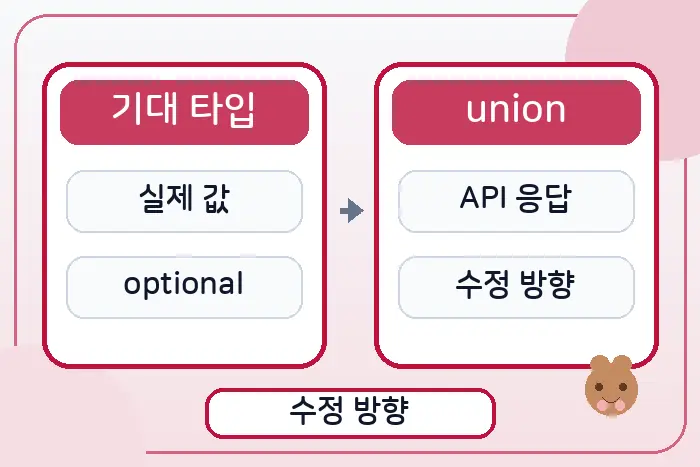
TypeScript의 Type is not assignable to type 오류는 어떤 값을 변수, 함수 인자, 컴포넌트 props, 객체 필드에 넣으려는 순간 타입이 맞지 않을 때 나타납니다. 실제 에러는 보통 Type 'string' is not assignable to type 'number'처럼 앞뒤에 구체적인 타입명이 붙어서 표시됩니다.
이 오류를 만났을 때 바로 as 타입 단언으로 덮는 것은 좋지 않습니다. 먼저 값을 보내는 쪽의 타입이 넓은지, 받는 쪽의 타입이 너무 좁은지, 실제 런타임 데이터가 타입 선언과 다른지 나눠서 확인해야 합니다.
optional property 때문에 생기는 Type is not assignable to type 오류
optional property는 값이 없을 수도 있다는 뜻입니다. 따라서 nickname?: string은 단순한 string이 아니라 string | undefined로 봐야 합니다. 이 값을 반드시 문자열이어야 하는 위치에 그대로 넣으면 오류가 납니다.
잘못된 코드
type User = {
  id: string;
  nickname?: string;
};

const user: User = { id: 'u1' };

const displayName: string = user.nickname;
// Type 'string | undefined' is not assignable to type 'string'.
수정 코드
type User = {
  id: string;
  nickname?: string;
};

const user: User = { id: 'u1' };

const displayName: string = user.nickname ?? '이름 없음';
왜 맞는지
user.nickname은 값이 있으면 문자열이지만, 없으면 undefined입니다. ??를 사용하면 undefined일 때 기본 문자열을 넣기 때문에 최종 결과는 항상 string이 됩니다. 즉, 받는 쪽 타입인 string에 맞게 값의 가능성을 좁힌 것입니다.
만약 기본값을 넣으면 안 되는 상황이라면 조건문으로 먼저 검사해도 됩니다. 중요한 기준은 optional 값을 사용하는 시점에 undefined 가능성을 처리해야 한다는 점입니다.
union type에 맞지 않는 값을 넣는 Type is not assignable to type 오류
union type은 허용되는 값의 목록을 좁혀두는 방식입니다. 예를 들어 상태값을 'idle' | 'loading' | 'success'로 정했다면, 임의의 string은 그 union type에 바로 들어갈 수 없습니다.
잘못된 코드
type RequestStatus = 'idle' | 'loading' | 'success';

const statusFromQuery: string = new URLSearchParams(location.search).get('status') ?? 'idle';

const status: RequestStatus = statusFromQuery;
// Type 'string' is not assignable to type 'RequestStatus'.
수정 코드
type RequestStatus = 'idle' | 'loading' | 'success';

function isRequestStatus(value: string): value is RequestStatus {
  return value === 'idle' || value === 'loading' || value === 'success';
}

const statusFromQuery = new URLSearchParams(location.search).get('status') ?? 'idle';

const status: RequestStatus = isRequestStatus(statusFromQuery)
  ? statusFromQuery
  : 'idle';
왜 맞는지
statusFromQuery는 URL에서 온 값이므로 TypeScript 입장에서는 어떤 문자열이든 될 수 있습니다. isRequestStatus 같은 type guard를 거치면 허용된 세 값 중 하나인지 확인할 수 있고, 조건문 안에서는 타입이 RequestStatus로 좁혀집니다.
이 방식은 단순히 오류를 없애는 것보다 안전합니다. 잘못된 URL 값이 들어와도 기본값으로 되돌릴 수 있고, 화면 상태도 union type 안에서만 움직입니다.
API 응답 타입 불일치로 생기는 Type is not assignable to type 오류
API 응답은 TypeScript 타입 선언과 실제 데이터가 어긋나기 쉬운 지점입니다. 서버에서는 가격을 문자열로 내려주는데 프론트엔드 타입은 숫자로 선언되어 있으면, 데이터를 그대로 대입하는 순간 Type is not assignable to type 오류가 납니다.
잘못된 코드
type Product = {
  id: string;
  name: string;
  price: number;
};

type ProductResponse = {
  id: string;
  name: string;
  price: string;
};

async function getProduct(): Promise<Product> {
  const res = await fetch('/api/product/1');
  const data: ProductResponse = await res.json();

  return data;
  // Type 'ProductResponse' is not assignable to type 'Product'.
}
수정 코드
type Product = {
  id: string;
  name: string;
  price: number;
};

type ProductResponse = {
  id: string;
  name: string;
  price: string;
};

function toProduct(response: ProductResponse): Product {
  return {
    id: response.id,
    name: response.name,
    price: Number(response.price),
  };
}

async function getProduct(): Promise<Product> {
  const res = await fetch('/api/product/1');
  const data: ProductResponse = await res.json();

  return toProduct(data);
}
왜 맞는지
외부에서 받은 데이터 타입과 앱 내부에서 쓰는 타입을 분리했기 때문에 맞습니다. ProductResponse는 서버 응답 모양을 그대로 표현하고, Product는 화면과 비즈니스 로직에서 쓰기 좋은 형태로 정리한 타입입니다. toProduct 함수에서 문자열 가격을 숫자로 변환하면 반환값은 Product 조건을 만족합니다.
실무에서는 이 변환 단계를 두는 편이 유지보수에 유리합니다. 서버 응답 필드명이 바뀌거나 숫자처럼 보이는 문자열이 내려오는 경우에도 변환 함수 한 곳에서 기준을 관리할 수 있기 때문입니다.
Type is not assignable to type 오류를 수정할 때 확인할 체크리스트
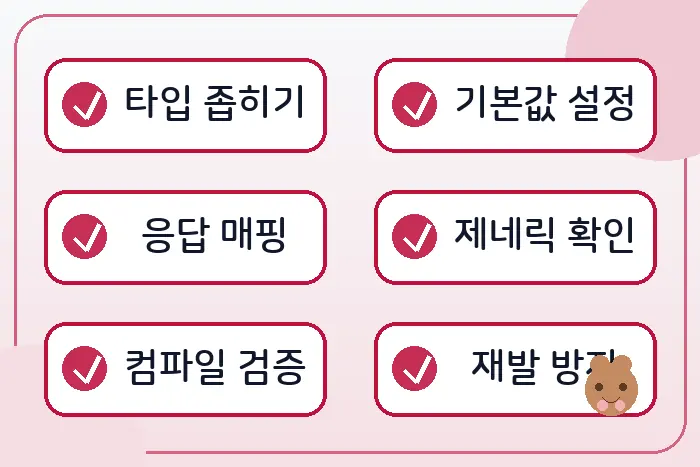
먼저 에러 메시지의 왼쪽 타입과 오른쪽 타입을 그대로 비교합니다. string | undefined가 string에 들어가려는지, 넓은 string이 좁은 union type에 들어가려는지, API 응답 타입과 내부 타입이 다른지 확인합니다.
그다음 값의 가능성을 줄입니다. optional 값은 기본값이나 조건문으로 처리하고, 외부 입력은 type guard로 검증하며, API 응답은 변환 함수를 거쳐 내부 타입으로 바꿉니다. 이 과정을 거치면 타입을 억지로 우회하지 않아도 오류가 줄어듭니다.
마지막으로 as SomeType을 붙이기 전에 정말 타입이 보장되는지 확인합니다. 타입 단언은 TypeScript에게 “내가 맞다”고 말하는 방식이라, 실제 데이터가 다르면 런타임 오류를 숨길 수 있습니다.
정리
TypeScript Type is not assignable to type 오류는 타입 시스템이 값을 막는 것이 아니라, 실제로 들어올 수 있는 값의 범위를 알려주는 신호에 가깝습니다. optional property는 undefined 가능성을 처리하고, union type은 허용된 값으로 좁히고, API 응답은 내부 타입으로 변환해야 합니다.
핵심은 오류를 없애는 코드가 아니라 값의 출처와 형태를 분명히 만드는 것입니다. 잘못된 코드 → 수정 코드 → 왜 맞는지 순서로 보면 같은 에러를 다른 파일에서 만나도 원인을 훨씬 빠르게 찾을 수 있습니다.